
Technology Stack
Professional Overview
I am a Full-Stack Developer specializing in high-performance backends and scalable cloud infrastructure. This single-page application serves as my interactive portfolio, built to demonstrate hands-on competence across my primary technology stack, from modern front-end design to robust back-end development principles. A hybrid architecture is implemented here, that uses local K8s-optimized TensorFlow models in development and fails over to Cloud Vision APIs in serverless production to optimize latency and cost.
Languages & Core
- Python: Flask, PEP 8, Scripting
- C / C++: Performance, Modern Standards
- JavaScript: ES6+, DOM, Async/Fetch
- SQL: Relational Database Design
- Bash: Shell Scripting & Automation
Web & Data
- Frameworks: Flask, Jinja2, Bootstrap 5
- UI/UX: Responsive & Adaptive Design
- AI/ML: TensorFlow, Keras, Scikit-learn
- Analysis: NumPy, Pandas, Matplotlib
- APIs: REST, JSON Serialization
DevOps & Systems
- Orchestration: Docker, Kubernetes
- Cloud: Google Cloud Platform (GCP)
- VCS: Git (Branching, PRs, Workflows)
- OS: Linux (Ubuntu/Debian) Admin
- Environment: Virtualenv, PIP, OCI Images
What You Will Find Here:
- **Core Technologies:** Practical examples and explanations of my skills in **Python**, **Bootstrap 5**, and data science tooling.
- **Development Process:** Evidence of a workflow using **Linux** and **Git**, demonstrating efficient software development practices.
Use the menu on the left or the main header links to quickly navigate through the skills and project examples.
 Python
Python is the primary language used for backend development and data processing, focusing on clean, readable code and robust error handling. Proficiency in object-oriented programming (OOP), efficient data structure handling (comprehensions), decorators, ... Python serves as the primary language for my data science and backend development stack. Python is utilized across all major components of this portfolio: managing the routing via Flask, processing external data in the API section, and performing complex calculations in the Pandas and future data science sections.
Interactive Demo: Python Performance (3 x Fibonacci) & Testing
This demo utilizes the server-side Python environment (Flask) to showcase two critical aspects of Python development: **Performance Optimization** and **Code Quality**. The first test compares the execution time of three Fibonacci functions (slow recursive, memoized recursive, and iterative loop) to demonstrate optimization needs and the practical use of advanced language features like a **memoization decorator** to drastically improve performance. The second test allows you to run a **pytest** unit test suite against the backend logic, confirming proficiency in writing and executing tests to ensure code reliability and correctness.
Server-Side Python Code Snapshot: api.py
######################################################################################
#                      Python Performance Test (3 x Fibonacci)                       #
######################################################################################
from functools import wraps
from time import time

N_VALUE = 13 # target Fibonacci number Fn where n = 33

# --- Helper Function ---
def duration(dur):
    """Formats time duration into [s ms µs] string."""
    s  = int(dur)
    ms = int((dur-s) * 1000)
    mu = int((dur-s-ms/1000) * 1000 * 1000)
    return f"{s:2}s {ms:3}ms {mu:3}μs"

# --- Decorators ---
def accelerator(func):
    """Decorator that caches a function's results."""
    cache = {}
    @wraps(func)
    def wrapper(*args):
        # 1. Check if the result is already known
        n_arg = args[0]
        if n_arg in cache:
            return cache[n_arg], None, None # Return cached result instantly
        # 2. Calculate the result if not cached
        result, run_time, out_str = func(*args)
        # 3. Store the result before returning
        cache[n_arg] = result
        return result, run_time, out_str
    # 4. EXPOSE THE CACHE CLEAR FUNCTION
    def clear_cache():
        """Clears the cache dictionary."""
        nonlocal cache
        cache = {}
    wrapper.clear_cache = clear_cache
    return wrapper

def timer(func):
    """Decorator that measures the duration of a function."""
    # Initialize a flag on the function object to track if we are in the timing context
    func._timing_context = {'in_progress': False}
    @wraps(func)
    def wrapper(*args, **kwargs):
        # Check if timing is already in progress for this function
        if func._timing_context['in_progress']:
            return func(*args, **kwargs)
        else:
            func._timing_context['in_progress'] = True
            start = time()
            try:
                # Execute the function (this will trigger all the recursive calls)
                result_tuple = func(*args, **kwargs)
            finally:
                # Ensure the flag is reset even if the function raises an error
                func._timing_context['in_progress'] = False
            # Print the total time only once
            result = result_tuple[0]
            run_time = time() - start
            # comparison_time_d1 = args[1]
            str1= " -> " + "   base time for speed comparison"
            if args[1]>0:
                str1= f" -> {round(args[1]/run_time):8,} times faster calculation"
            out_str = f"Finished: {func.__name__}({args[0]}) = {result}, run_time: {duration(run_time)}{str1}"
            return result, run_time, out_str
    return wrapper

@timer
def slow_fibonacci(n, d1): # This simulates a slow, expensive calculation without accelerator
    if n < 0:
        return 0, None, None
    if n <= 1:
        return n, None, None
    return slow_fibonacci(n - 1, d1)[0] + slow_fibonacci(n - 2, d1)[0], None, None

@accelerator
@timer
def fast_fibonacci(n, d1): # This simulates a slow, expensive calculation with accelerator
    if n < 0:
        return 0, None, None
    if n <= 1:
        return n, None, None
    return fast_fibonacci(n - 1, d1)[0] + fast_fibonacci(n - 2, d1)[0], None, None

@timer
def loop_fibonacci(n,d1): # This simulates a loop calculation without accelerator
    f2=0
    f1=1
    if n<1:
        return 0, None, None
    for _ in range(n-1):
        f1 = f2 + f1
        f2 = f1 - f2
    return f1, None, None

# ####################################################### TESTING AREA ####################################################### #
# import re
# N_VALUE = 1
# fib_result1, total_time1, str1 = slow_fibonacci(N_VALUE, 0)           # slow recursive fibonacci calculation without accelerator
# fib_result2, total_time2, str2 = fast_fibonacci(N_VALUE, total_time1) # slow recursive fibonacci calculation with accelerator
# fib_result3, total_time2, str3 = loop_fibonacci(N_VALUE, total_time1) # loop fibonacci calculation
# print(f"{re.sub(r"<.*?>", "", str1)}\n{re.sub(r"<.*?>", "", str2)}\n{re.sub(r"<.*?>", "", str3)}")
Server-Side Python Code Snapshot: api_test.py
######################################################################################
#         Python api_test.py -  automated testing using the pytest framework         #
######################################################################################
import pytest
import time
from fibonacci import fast_fibonacci, slow_fibonacci, loop_fibonacci

# --- Constants for Tests ---
TEST_N = 10
EXPECTED_RESULT = 55 # F(10) is 55
N_PERF = 30 # Used for caching performance test

# --- Fixture to ensure cache is clear before performance tests ---
@pytest.fixture(autouse=True)
def clear_fib_cache():
    """Clears the cache for fast_fibonacci before running tests."""
    try:
        # Note: We rely on the decorator adding the clear_cache method
        fast_fibonacci.clear_cache()
    except AttributeError:
        # Pass silently if the decorator structure is modified or cache isn't available
        pass

# --- Correctness Tests ---
def test_01_slow_recursive_correctness():
    """Tests the Naive Recursive function (O(2^n))."""
    # Functions return (result, time, string). We only care about the result [0].
    result, _, _ = slow_fibonacci(TEST_N, 0)
    assert result == EXPECTED_RESULT, f"Slow recursive failed: Expected {EXPECTED_RESULT}, got {result}"

def test_02_fast_recursive_correctness():
    """Tests the Memoized Recursive function (O(n))."""
    result, _, _ = fast_fibonacci(TEST_N, 0)
    assert result == EXPECTED_RESULT, f"Fast recursive failed: Expected {EXPECTED_RESULT}, got {result}"

def test_03_loop_iterative_correctness():
    """Tests the Iterative Loop function (O(n))."""
    result, _, _ = loop_fibonacci(TEST_N, 0)
    assert result == EXPECTED_RESULT, f"Loop iterative failed: Expected {EXPECTED_RESULT}, got {result}"

# --- Performance Test ---
def test_04_fast_recursive_performance():
    """
    Tests if the fast_fibonacci function is significantly faster on a second run
    (proving the O(1) cache hit).
    """
    # 1. First run (populates cache)
    start_time_1 = time.time()
    fast_fibonacci(N_PERF, 0)
    duration_1 = time.time() - start_time_1

    # 2. Second run (cache hit)
    start_time_2 = time.time()
    fast_fibonacci(N_PERF, 0)
    duration_2 = time.time() - start_time_2

    # Assert the second run is much faster (e.g., at least 10x faster)
    assert duration_2 < duration_1 * 0.1 + 0.001, \
        f"Cache failed: Second run ({duration_2:.6f}s) was not significantly faster than first ({duration_1:.6f}s)."

# --- Edge Case / Validation Test ---
# We use parametrize to run the same test logic with different inputs/expected outcomes
@pytest.mark.parametrize("n_input, expected_result", [
    (-2, 0),   # F(-2) should be 0
    (0, 0),    # F(0)  should be 0
    (1, 1),    # F(1)  should be 1
    (2, 1),    # F(2)  should be 1
    (13, 233)  # F(13) should be 233
])
def test_05_boundary_correctness(n_input, expected_result):
    """Test boundary and small inputs for loop function."""
    result, _, _ = loop_fibonacci(n_input, 0)
    assert result == expected_result, f"F({n_input}) failed. Expected {expected_result}, got {result}"

def test_06_negative_input_loop():
    """Tests that the improved loop_fibonacci correctly returns 0 for n < 1."""
    # Based on your fix: If n < 1, the function should return 0
    result, _, _ = loop_fibonacci(-5, 0)
    assert result == 0, "Loop function did not handle negative input correctly (expected 0)."

#  command line:
#  pytest test_fibonacci.py
Click the "RUN fibonacci.py" button above to execute the server-side Python function and see the performance results here. or Click the "RUN test_fibonacci.py" button above to execute the server-side Pytest framework and see the test results here.
Technical Toolkit: Python Ecosystem
A comprehensive index of libraries and frameworks utilized across my web development, automation, and data science projects.
Automation & Scraping
- Selenium WebDriver
- Beautiful Soup 4
- Requests API
Data Science & Viz
- Plotly / Matplotlib
- Seaborn
- Scikit-learn
Backend & Database
- SQLAlchemy
- WTForms
- Pytest
 REST API
Test Project: External API Consumption & Data Pipeline Foundation
This section demonstrates proficiency in the critical first step of any data science pipeline: **reliable and efficient data acquisition** from external sources, paired with **cloud-native persistence**. It use Python's Flask backend to consume the external **The Movie Database (TMDB) API** and then serve the processed data to the frontend.
This setup implements a robust **Cache-or-Fetch** pattern to optimize performance and respect API rate limits. The caching layer utilizes **Google Cloud Firestore**, demonstrating skills in building fast, scalable, and cloud-persistent data solutions.
Focus Area: TMDB Data Acquisition
To source a dynamic, real-world dataset, the **The Movie Database (TMDB) API** was utilized. This requires proficiency in:
- **API Backend Design:** Building a clean Flask endpoint (
/api/fetch_movies) to serve processed JSON data. - **REST API Consumption:** Experience using the
requestslibrary for authenticated external API interaction. - **Cloud Persistence (Firestore):** Implementing the **Cache-or-Fetch** pattern using a live NoSQL database (Firestore) instead of local files for better scalability and real-time status feedback.
- **Request Handling:** Using the
requestslibrary to handle rate-limited API calls and pagination for large datasets. - **JSON Processing:** Efficiently parsing and flattening complex JSON structures containing nested lists (e.g., genre lists, production companies).
- **Data Transformation:** Preparing raw data into a structured format suitable for further analysis (e.g., in the Pandas section).
Server-Side Code Snapshot (Python / Rest API Implementation / Cache Check Logic):
# ---------------------------------------------------------------------------------- #
# ---------------------------- FIRESTORE INITIALIZATION ---------------------------- #
# ---------------------------------------------------------------------------------- #
db_firestore_client = None
if api_utils.FLASK_ENV != "USE_LOCAL_FILE_FOR_TESTING":
    if not firebase_admin._apps:                             # Prevent "App already exists" error
        try:
            if api_utils.FLASK_ENV == "PRODUCTION":
                print("Firestore: Initializing in PRODUCTION mode (No JSON key needed).")
                firebase_admin.initialize_app()              # GCP Cloud Run Path: Uses Service Identities automatically
            else:
                # Local/Development Path: Uses the serviceAccountKey.json
                print(f"Firestore: Initializing in DEVELOPMENT mode using: {api_utils.GOOGLE_APPLICATION_CREDENTIALS}")
                cred = credentials.Certificate(api_utils.GOOGLE_APPLICATION_CREDENTIALS)
                firebase_admin.initialize_app(cred)          # Initialize the app
            print("SUCCESS: Firestore client initialized.")
            db_firestore_client = firestore.client()         # Get the Firestore client instance
        except Exception as e:
            print(f"FATAL ERROR during Firestore initialization. Firestore will be disabled: {e}")

######################################################################################
###                    REST API section AJAX endpoint                              ###
###            Exposes a RESTful endpoint to the frontend                          ###
###   It calls the core data loading function and returns a clean subset of data   ###
######################################################################################
@app.route('/api/fetch_movies', methods=['POST'])
def fetch_movies_endpoint():

    # Load 1 page (20 movies) for the cache, but only return top 5
    data, cache_status = api_utils.load_movie_data(6, db_firestore_client)
    if data.get('error'):
        return jsonify({"movies": [], "cache_status": cache_status, "error": data.get('error')}), 500

    # Process movie list (Limit to top 5)
    movie_list = []
    for i, result in enumerate(data.get('results', [])):
        if i >= 5: # Limit to top 5 for display
            break
        movie_list.append({
            "title": result.get('title'),
            "score": f"{result.get('vote_average'):.1f}", # Format score to 1 decimal
            "votes": result.get('vote_count'),
            "release_date": result.get('release_date'),
            "year": int(result.get('release_date', '0000').split('-')[0]) # Correctly extracts the year
        })
    # Return the full JSON response, including the new cache_status
    return jsonify({
        "movies": movie_list,
        "cache_status": cache_status,
        "total_cached": len(data.get('results', [])),
        "expiration": api_utils.CACHE_TTL_MINUTES/60
    })

# ---------------------------------------------------------------------------------- #
# ---                            FIRESTORE LOAD DATA                             --- #
# --- Reads the cached movie data and timestamp from the Firestore document.     --- #
# --- for testing "USE LOCAL FILE FOR TESTING" Reads the movie data from local file. #
# ---------------------------------------------------------------------------------- #
def load_TMDB_data(db_client):
    if FLASK_ENV == "USE_LOCAL_FILE_FOR_TESTING":                         # testing - Fetch from Local File
        if os.path.exists(TMDB_DATA_FILE):
            try:
                with open(TMDB_DATA_FILE, 'r', encoding='utf-8') as f:
                    data = json.load(f)
                    status_msg = f"{FLASK_ENV}: Fetched from local file TMDB_DATA_FILE: {TMDB_DATA_FILE}"
                    print(status_msg)
                    return data.get('results', []), status_msg
            except Exception as e:
                status_msg = f"{FLASK_ENV}: Failed to fetch data from local file TMDB_DATA_FILE: {TMDB_DATA_FILE}"
                print(status_msg)
        else:
            status_msg = f"{FLASK_ENV}: Failed to fetch data. local file not exists TMDB_DATA_FILE: {TMDB_DATA_FILE}"
            print(status_msg)
        return None, status_msg

    if db_client is None:                                                        # Fetch from Firestore
        print("Cloud read skipped: Firestore client is None.")
        return None, "Firestore not initialized."
    try:
        doc_ref = db_client.collection(FIRESTORE_COLLECTION).document(FIRESTORE_DOCUMENT)
        doc = doc_ref.get()
        if not doc.exists:
            print("Cloud cache document not found.")
            return None, "Cloud cache empty."
        data_entry = doc.to_dict()
        last_fetch = data_entry.get("timestamp")
        now_utc = datetime.now(timezone.utc)
        if last_fetch:
            # Firestore timestamps are usually timezone-aware datetime objects
            if not last_fetch.tzinfo:
                # If timezone is missing, assume UTC for local comparison
                last_fetch = last_fetch.replace(tzinfo=timezone.utc)
            # Check if the cache is expired
            if last_fetch + timedelta(minutes=CACHE_TTL_MINUTES) > now_utc:
                status_msg = f"SUCCESS: Data loaded from REAL Firestore Cache (Last updated: {last_fetch.strftime('%Y-%m-%d %H:%M:%S UTC')})."
                print(status_msg)
                return data_entry.get("data"), status_msg
            else:
                status_msg = f"REAL Firestore Cache expired. Last fetch: {last_fetch.strftime('%Y-%m-%d %H:%M:%S UTC')}"
                print(status_msg)
                return None, status_msg
        else:
             status_msg = "Firestore document found, but timestamp field is missing or invalid."
             print(status_msg)
             return None, status_msg
    # Use specific GCP exceptions for better clarity
    except gcp_exceptions.PermissionDenied as e:
        status_msg = f"Error reading from Firestore (Permission Denied): {e}"
        print(status_msg)
        return None, status_msg
    except Exception as e:
        status_msg = f"Generic Error reading from Firestore: {e}"
        print(status_msg)
        return None, status_msg

# ---------------------------------------------------------------------------------- #
# ---                     SAVE TMDB DATA TO FIRESTORE CLOUD                      --- #
# --- Writes the movie data and the current timestamp to the Firestore document.---- #
# ---------------------------------------------------------------------------------- #
def save_TMDB_data_to_cloud(data, db_client):
    if db_client is None:
        status_msg = f"--- Cloud write skipped: Firestore client is None/not initialized."
        print(status_msg)
        return status_msg
    print("Writing data to REAL Firestore Persistence layer...")
    data_to_store = {
        # IMPORTANT: Use timezone.utc for consistency
        "timestamp": datetime.now(timezone.utc),
        "data": data
    }
    try:
        doc_ref = db_client.collection(FIRESTORE_COLLECTION).document(FIRESTORE_DOCUMENT)
        doc_ref.set(data_to_store)
        status_msg = "SUCCESS: Data written to Firestore."
        print(status_msg)
        return status_msg
    # Use specific GCP exceptions for definitive error reporting
    except gcp_exceptions.PermissionDenied as e:
        status_msg = f"--- FIRESTORE WRITE FAILED (Permission Denied): Check Rules --- Error: {e}"
        print(status_msg)
        return status_msg
    except Exception as e:
        status_msg = f"--- FIRESTORE WRITE FAILED (Unknown Error) --- Error: {e}"
        print(status_msg)
        return status_msg

# ---------------------------------------------------------------------------------- #
# ---                   TMDB Data Loading (Cache-or-Fetch Logic)                ---- #
# --- The main data fetching function:                                          ---- #
# --- Fetch tmdb_data from FIRESTORE or TMDB API or Local File                  ---- #
# ---------------------------------------------------------------------------------- #
def load_movie_data(num_pages=1, db_client=None):
    tmdb_data, status_message = load_TMDB_data(db_client)                # Fetch from FIRESTORE or Local File
    if tmdb_data:
        return tmdb_data, status_message
    if FLASK_ENV == "USE_LOCAL_FILE_FOR_TESTING":               # testing - Fetch from Local File
        return None, status_message

    print(f"No valid cache found. Fetching from TMDB API...")   # Fetch from external API (TMDB)
    all_results = []
    for page in range(1, num_pages + 1):    # Fetch movie data (1 page = 20 movies)
        url = f"{BASE_URL}{page}"
        try:
            response = requests.get(url, headers=headers)
            response.raise_for_status()     # Raises an HTTPError for bad responses (4xx or 5xx)
            data = response.json()
            all_results.extend(data.get('results', []))
            print(f"Fetched page {page}. Total movies: {len(all_results)}")
            if len(all_results) >= 120:     # Stop after 120 movies (6 page)
                break
        except requests.exceptions.RequestException as e:
            error_msg = f"Failed to fetch data from TMDB: {e}"
            print(error_msg)                # Return empty data and the error message
            return {"results": [], "error": error_msg}, error_msg

    if all_results:                         # Save tmdb_data, return fetched data and status
        data_to_store = {"results": all_results}
        write_status = save_TMDB_data_to_cloud(data_to_store, db_client)
        return data_to_store, f"TMDB API Fetched and cache written: {write_status}"
    else:
        print(f"Error: Save to Cloud Cache [all_results] is empty")

    return {"results": []}, status_message  # Return empty data and the last status message
Interactive Demo: Fetch Top Movies
Click the RUN button above to execute the server-side API fetch logic and see the data.
Key Competencies Demonstrated:
- **Request Handling:** Secure, server-side interaction with external APIs.
- **Cloud Caching:** Utilizing Firestore for persistence, reducing latency and reliance on the external API.
- **Web Backend/Flask:** Implementing a custom RESTful API endpoint.
 Pandas & Data Analysis
Test Project: Data Cleaning, Transformation, and Aggregation
This section showcases the use of the **Pandas** library for data science essentials: loading raw data from the cloud cache, performing complex **data transformation**, and generating **meaningful analytical insights**. The data for processing is downloaded in the REST API section.
The analysis applies a well-known industry standard, the **Weighted Rating Formula (similar to IMDB's)**, to the raw TMDB scores. This demonstrates the ability to implement statistical models in Python to derive a more accurate and robust metric than a simple average score.
Key Analytical Tasks:
- **Data Loading:** Ingesting complex JSON data (from Firestore via Flask) directly into a Pandas DataFrame.
- **Transformation:** Cleaning date fields, calculating the 75th percentile for vote counts, and applying the Weighted Score formula.
- **Aggregation:** Grouping data by year and calculating mean scores to find trends.
- **Filtering & Sorting:** Identifying the top-rated movies based on the calculated Weighted Score.
Interactive Demo: Run Pandas Analysis
Click the RUN button above to process the TMDB data using Pandas on the backend.
Server-Side Code Snapshot (Python / Pandas Implementation):
######################################################################################
###                              PANDAS endpoint                                   ###
###   Retrieves TMDB data, processes it using Pandas, and returns summary stats.   ###
###      Demonstrates data loading, cleaning, transformation, and aggregation.     ###
######################################################################################
@app.route('/api/get_pandas_data', methods=['GET'])
def get_pandas_analysis():
    raw_data, status_message = api_utils.load_movie_data(6, db_firestore_client)  # Load the raw data (Cache-or-Fetch logic)
    df, C, m = api_utils.process_data_for_analysis(raw_data) # cleans, calculates C, m and adds the  weighted_score column
    if df.empty:
        return jsonify({"error": "Failed to load movie data for Pandas analysis.", "source_status": status_message}), 500
    qualified_movies = df[df['vote_count'] >= m].copy()
    qualified_movies['weighted_score'] = qualified_movies.apply(lambda row: api_utils.weighted_rating(row, m, C), axis=1)

    # Top 5 Best Rated Qualified Movies (by Weighted Score)
    top_movies_weighted = qualified_movies.sort_values(by='weighted_score', ascending=False).head(5)

    # Simple Summary Statistics
    stats = {
        'mean_score': f"{df['vote_average'].mean():.2f}",
        'median_votes': f"{df['vote_count'].median():,.0f}",
        'total_movies_analyzed': len(df),
        'min_votes_for_qualification': f"{m:,.0f}"
    }

    # Aggregation by Year (Top 3 Recent Years with Highest Average Score)
    yearly_avg = df.groupby('release_year')['vote_average'].mean().reset_index()
    yearly_avg = yearly_avg.sort_values(by=['release_year', 'vote_average'], ascending=[False, False]).head(3)

    # Convert DataFrames to JSON structures - Prepare Final JSON Response
    top_movies_json = top_movies_weighted[[
        'title', 'vote_average', 'vote_count', 'release_year', 'weighted_score'
    ]].to_dict(orient='records')

    yearly_json = yearly_avg.to_dict(orient='records')
    return jsonify({
        "status": "SUCCESS",
        "source_status": status_message,
        "summary_stats": stats,
        "top_movies_weighted": top_movies_json,
        "top_years": yearly_json
    })
 NumPy Data Preprocessing
Test Project: NumPy Data Preprocessing
This section showcases the use of the **NumPy** library for fast data manipulation: specifically showing two common preprocessing techniques: Z-Score Standardization and Min-Max Normalization applied to movie scores. The data for processing is downloaded in the REST API section and cleaned in the PANDAS section.
Interactive Demo: Run NumPy Analysis (Standardization & Normalization)
Click the button to run NumPy Analysis on the TMDB data.
Server-Side Code Snapshot (Python / NumPy Implementation):
######################################################################################
###                                  NUMPY ENDPOINT                                ###
### Standardization (Z-score) and Normalization (Min-Max Scaling) on movie scores. ###
######################################################################################
@app.route('/api/run_numpy_analysis', methods=['GET'])
def run_numpy_analysis():
    raw_data, status_message = load_movie_data(6)
    if not raw_data or not raw_data.get('results'):
        return jsonify({"error": f"Failed to load data for Plotly. Status: {status_message}"}), 500
    try:
        # 1. Prepare Data
        df = pd.DataFrame(raw_data['results'])

        # Filter for numerical stability
        df = df[df['vote_average'].notna() & (df['vote_count'] > 0)].copy()

        # Extract the relevant series (Score) into a NumPy array
        scores = df['vote_average'].to_numpy()
        movie_titles = df['title'].tolist()

        if len(scores) < 5:
            return jsonify({"error": "Not enough data points for NumPy analysis."}), 500

        # 2. Standardization (Z-Score): z_scores = (scores - mean) / std_dev
        mean = np.mean(scores)
        std_dev = np.std(scores)
        z_scores = (scores - mean) / std_dev

        # 3. Normalization (Min-Max Scaling): (X - min) / (max - min)
        min_score = np.min(scores)
        max_score = np.max(scores)
        min_max_scores = (scores - min_score) / (max_score - min_score)

        # 4. Compile results for the top movies for display
        results = []
        for i in range(NUMPY_DISPLAY_LIMIT):
            if i >= len(scores):
                break
            results.append({
                "title": movie_titles[i],
                "raw": f"{scores[i]:.2f}",
                "z_score": f"{z_scores[i]:.4f}",
                "min_max": f"{min_max_scores[i]:.4f}"
            })

        analysis_stats = {
            "mean": f"{mean:.2f}",
            "std": f"{std_dev:.2f}",
            "min": f"{min_score:.2f}",
            "max": f"{max_score:.2f}"
        }

        return jsonify({
            "results": results,
            "stats": analysis_stats
        })
    except Exception as e:
        print(f"Numpy Data Generation Failed: {e}")
        return jsonify({"error": f"Internal Server Error during Numpy data generation: {str(e)}"}), 500
 SCIKIT-LEARN & Predictive Modeling
Test Project: Regression Analysis and Model Evaluation
This section demonstrates essential machine learning workflow steps using scikit-learn, a leading library for classical ML algorithms. It use data from TMDB (top 120 movies) to train a model to predict a movie's weighted score. The processed data is downloaded in the REST API section and cleaned in the PANDAS section.
Key ML Concepts Demonstrated:
- **Feature Engineering:** Using features like `vote_count` and `popularity` to predict the target variable.
- **Train/Test Split:** Dividing data for training and unbiased model evaluation.
- **Linear Regression:** Training a simple model to establish linear relationships.
- **Model Evaluation:** Calculating key metrics like the $R^2$ Score and Mean Squared Error (MSE).
- **Cross-Validation:** Ensuring model robustness across different subsets of the data.
Interactive Demo: Run Scikit-learn Regression
Click the button to train and evaluate the regression model on the TMDB data.
Server-Side Code Snapshot (Python / Scikit-learn Implementation):
######################################################################################
###                       SCIKIT-LEARN ANALYSIS ENDPOINT 2                         ###
###      Generates data for a 3D surface plot to visualize the Weighted Score      ###
###                   function based on Raw Score and Vote Count.                  ###
######################################################################################
@app.route('/api/get_sklearn_plot_data', methods=['GET'])
def get_sklearn_plot_data():
    raw_data, status_message = api_utils.load_movie_data(6, db_firestore_client)

    if not raw_data or not raw_data.get('results'):
        return jsonify({"error": f"Failed to load data for Plotly. Status: {status_message}"}), 500

    try:
        df = pd.DataFrame(raw_data['results'])

        # Calculate C and m from the current dataset (as in the analysis)
        df['vote_count'] = pd.to_numeric(df['vote_count'], errors='coerce')
        df['vote_average'] = pd.to_numeric(df['vote_average'], errors='coerce')
        df.dropna(subset=['vote_count', 'vote_average'], inplace=True)
        df = df[df['vote_count'] > 0]

        C = df['vote_average'].mean()
        m = df['vote_count'].quantile(api_utils.TMDB_QUANTILE)

        # 1. Define the range for the two input axes (X and Y)
        # X-axis: Votes (v). Range from 0 to 5 times the min qualified votes (m).
        v_min = 0
        v_max = int(m * 5) + 1
        votes = np.linspace(v_min, v_max, 50) # 50 points for smoothness

        # Y-axis: Raw Score (R). Range from 5.0 to 10.0 (TMDB range).
        R_min = 5.0
        R_max = 10.0
        raw_scores = np.linspace(R_min, R_max, 20) # 20 points

        # 2. Create the meshgrid for all combinations
        V, R = np.meshgrid(votes, raw_scores)

        # 3. Calculate the Z-axis (Weighted Score) for every point in the grid
        # The formula: (v / (v + m)) * R + (m / (v + m)) * C
        Z = (V / (V + m)) * R + (m / (V + m)) * C

        # 4. Prepare the data for Plotly (must be converted to lists)
        plot_data = {
            "x": V.tolist(),        # Votes (x-axis)
            "y": R.tolist(),        # Raw Score (y-axis)
            "z": Z.tolist(),        # Weighted Score (z-axis)
            "C_constant": f"{C:.3f}",
            "m_constant": f"{m:.0f}"
        }
        return jsonify(plot_data)
    except Exception as e:
        print(f"Plotly Data Generation Failed: {e}")
        return jsonify({"error": f"Internal Server Error during Plotly data generation: {str(e)}"}), 500

# ---------------------------------------------------------------------------------- #
# ---                        PANDAS & SCIKIT-LEARN                               --- #
# ---            Formula: W = (v / (v + m)) * R + (m / (v + m)) * C              --- #
# ---------------------------------------------------------------------------------- #
def weighted_rating(row, m, C):                   # m = minimum votes required (75th percentile of vote_count)
    v = row['vote_count']                         # v = number of votes for the movie (vote_count)
    R = row['vote_average']                       # R = average for the movie (vote_average)
    return (v / (v + m)) * R + (m / (v + m)) * C  # C = mean vote across the whole report (mean of vote_average)

# ---------------------------------------------------------------------------------- #
# ---                     PANDAS/SKLEARN UTILITY FUNCTION                       ---- #
# --- Processes the raw TMDB movie data (list of dicts) into a Pandas DataFrame, --- #
# --- cleans it, calculates the weighted score formula constants (C and m),      --- #
# --- and adds the final weighted_score column.                                  --- #
# --- Returns tuple: (pd.DataFrame, float C, int m)                              --- #
# ---------------------------------------------------------------------------------- #
def process_data_for_analysis(raw_data):
    if not raw_data or not raw_data.get('results'):
        return pd.DataFrame(), 0.0, 0
    df = pd.DataFrame(raw_data['results'])                              # Convert list of dicts to DataFrame

    # Convert necessary columns to appropriate types and handle NaNs    # Cleaning and Standardization
    df = df.dropna(subset=['vote_average', 'vote_count', 'popularity', 'release_date'])
    df['vote_count'] = df['vote_count'].astype(int)                     # Convert types
    df['vote_average'] = df['vote_average'].astype(float)

    # Extract year
    df['release_year'] = pd.to_datetime(df['release_date'], errors='coerce').dt.year
    df.dropna(subset=['release_year'], inplace=True)
    df['release_year'] = df['release_year'].astype(int)

    # Use drop_duplicates with subset='id' to prevent the 'unhashable type: list' error
    df.drop_duplicates(subset=['id'], keep='first', inplace=True)

    # Remove rows where key metrics are missing or zero (not a valid movie rating)
    df = df[
        (df['vote_count'] > 0) &
        (df['vote_average'] > 0) &
        (df['popularity'].notna()) &
        (df['vote_average'].notna())
    ].copy()
    if len(df) == 0:                                                     # IMDB Weighted Rating Formula Implementation
        return df, 0.0, 0                                                # Formula: W = (v / (v + m)) * R + (m / (v + m)) * C
    C = df['vote_average'].mean()                                        # C = mean vote across the whole report (mean of vote_average)
    m = df['vote_count'].quantile(TMDB_QUANTILE)                         # m = minimum votes required (75th percentile of vote_count)
    m = max(TMDB_MIN_VOTES, int(m))   # Ensure m is an integer and at least TMDB_MIN_VOTES = 50
    # Apply the function to create the new column                        # R = average for the movie (vote_average)
    df['weighted_score'] = df.apply(weighted_rating, axis=1, m=m, C=C)   # v = number of votes for the movie (vote_count)

    # Select final columns for clarity and relevance
    df = df[['title', 'vote_average', 'vote_count', 'popularity', 'release_date', 'release_year', 'weighted_score']].copy()
    return df, C, m
 TensorFlow Analysis
Test Project: MNIST Digit Recognition & Image Heuristics
This section showcases the use of the **TensorFlow** library. It will let users draw a digit, and get a prediction from a TensorFlow model. It demonstrates real-time image preprocessing, centering heuristics, and deep learning inference. The MNIST dataset is the 'Hello World' of computer vision. It compares your input to thousands of labeled handwritten digits. A hybrid architecture is implemented here, that uses local K8s-optimized TensorFlow models in development and fails over to Cloud Vision APIs in serverless production to optimize latency and cost.
Interactive Demo: Draw a single digit (0-9) in the box below. A neural network will process the 28x28 grayscale image and attempt to identify it.
Draw Here
Reference Data
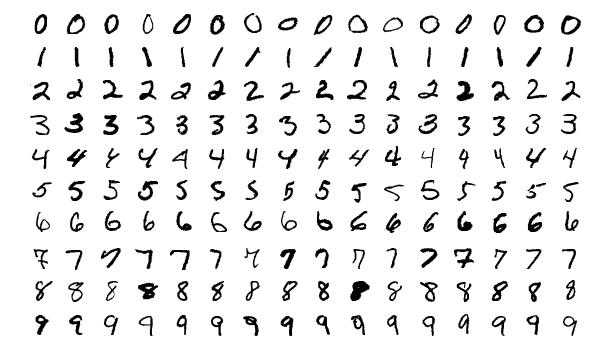
Training Set: 60,000 Samples
Heuristic Checks:
- Centering: Enabled
- Noise Filtering: Active
AI Insights
Neural Input:

Classification Result:

Server-Side Code Snapshot (Python / TensorFlow Implementation):
######################################################################################
###                            TensorFlow ENDPOINT                                 ###
###           Digit recognition (MNIST) - The "hello world" of ML/DL               ###
###         build+train a neural net to recognize hand-written digits              ###
######################################################################################
@app.route("/predict", methods=["POST"])
def predict():
    if "image" not in request.files:
        return jsonify({"result": "Program error - No image uploaded"}), 400
    try:
        file = request.files["image"]
        arr_2d = api_utils.preprocess_image(file)           # Preprocess to 2D array (28, 28) convert to grayscale, resize, convert to numpy array, normalize ...
        img_b64 = api_utils.get_image_b64(arr_2d)           # Generate Base64 from 2D array for Gemini/Response
        digit = None
        confidence = 0.0
        margin = 0.0
        engine = "TensorFlow (Local)"
        if np.sum(arr_2d > 0.2) < 10:                           # Almost nothing drawn
            digit = "EMPTY"
            result = "Drawing/Canvas is empty or too small."
            confidence = 0.0
        else:
            if api_utils.HAS_TF:                                # Using Local TensorFlow Model...
                model = api_utils.get_or_train_model1()
                input_arr = arr_2d.reshape(1, 28, 28)           # Reshape ONLY for the prediction
                probs = model.predict(input_arr, verbose=0)[0]  # predict Using Local TensorFlow Model

                digit = int(np.argmax(probs))
                confidence = float(np.max(probs))
                sorted_probs = np.sort(probs)                   # Additional TF Heuristics
                margin = float(sorted_probs[-1] - sorted_probs[-2])
            else:                                               # TensorFlow not found. Use Google Gemini API...
                gemini_res = api_utils.call_gemini_vision(img_b64)
                digit = gemini_res.get("digit")
                confidence = float(gemini_res.get("confidence", 0.0))
                margin = 0.5
                engine = "Gemini (Cloud API)"
            # Heuristics for "No Digit"
            if str(digit) == "gemini_ERR":
                result = "Google Gemini API AI Service temporarily unavailable."
            elif str(digit) == "gemini_API":
                result = "Google Gemini API key not valid."
            elif confidence < 0.80 or margin < 0.4:             # Model is guessing/unsure
                digit = "UNSURE"
                source = "TF Model" if api_utils.HAS_TF else "Gemini API"
                result = f"Input is unclear. {source} is guessing/unsure."
            else:
                result = f"{digit} (confidence={confidence:.2f})"
        return jsonify({"result": result,
                        "digit": str(digit),
                        "confidence": str(round(confidence, 4)),
                        "mnist_img": img_b64,
                        "engine": engine})
    except Exception as e:
        print(f"Prediction error: {e}")
        return jsonify({"result": f"Server Error: {str(e)}"}), 500

# ---------------------------------------------------------------------------------- #
# ---                            TensorFlow with Keras                           --- #
# ---                            train a model on MNIST                          --- #
# ---                 This will only train on first app start                    --- #
# ---------------------------------------------------------------------------------- #
def get_or_train_model1():
    global mnist_model1
    if mnist_model1 is not None:
        return mnist_model1
    basedir = os.path.abspath(os.path.dirname(__file__))
    model_path = os.path.join(basedir, "mnist_model1.h5")
    try:
        mnist_model1 = tf.keras.models.load_model(model_path)         # Load the model if it exists
        print(f"MNIST {model_path} loaded from disk.")
    except Exception as e:
        print(f"Training a new MNIST model... Reason: {e}")
        (x_train, y_train), _ = tf.keras.datasets.mnist.load_data()
        # x_train, x_test = x_train / 255.0, x_test / 255.0           # Normalize pixel values to be between 0 and 1
        x_train = x_train / 255.0                                     # Normalize pixel values to be between 0 and 1
        mnist_model1 = models.Sequential([                            # Build a simple Sequential model
            layers.Flatten(input_shape=(28, 28)),
            layers.Dense(128, activation='relu'),
            layers.Dense(10, activation='softmax')
            # layers.Dropout(0.2)                                     # Add dropout for better generalization
        ])
        mnist_model1.compile(optimizer='adam',
                      loss='sparse_categorical_crossentropy',
                      metrics=['accuracy'])
        mnist_model1.fit(x_train, y_train, epochs=5, batch_size=32, verbose=2)    # Train for 5 epochs
        # mnist_model1.evaluate(x_train, y_train, verbose=0)          # initialize metrics (optional, not needed for most)
        mnist_model1.save(model_path)                                 # Save for future use
    return mnist_model1

# ---------------------------------------------------------------------------------- #
# ---                            TensorFlow with Keras                           --- #
# ---                             preprocess_image 2D                            --- #
# ---             Returns a 2D numpy array (28, 28) normalized to 0-1.           --- #
# ---------------------------------------------------------------------------------- #
def preprocess_image(image_file):
    img = Image.open(image_file).convert("L").resize((28, 28)) # Open and convert to grayscale
    # Invert if necessary (MNIST is white on black) If users draw white on black in HTML, we stay as is.
    inverted_img = img                                         # Assuming white on black
    bbox = inverted_img.getbbox()                              # Find bounding box of the drawing to center it
    if bbox:                                                   # This helps a lot with "squiggles" or off-center drawings
        img = inverted_img.crop(bbox)                          # Crop to the digit and add padding to make it 20x20 (MNIST style)
        img.thumbnail((20, 20), Image.Resampling.LANCZOS)      # Resize the actual drawing to 20x20
        new_img = Image.new("L", (28, 28), 0)                  # Create a new black 28x28 canvas
        offset = ((28 - img.width) // 2, (28 - img.height) // 2)
        new_img.paste(img, offset)                             # paste the 20x20 digit in the center
        img = new_img
    else:
        img = img.resize((28, 28), Image.Resampling.LANCZOS)   # Empty canvas
    arr = np.array(img)                                        # Convert to array
    if np.mean(arr) > 127:
        arr = 255 - arr
    return arr / 255.0                                         # normalize

# ---------------------------------------------------------------------------------- #
# ---                            TensorFlow with Keras                           --- #
# ---              preprocess_image base64 PNG for Google Gemini API             --- #
# ---                RConverts a 2D numpy array (0-1) to base64 PNG.             --- #
# ---------------------------------------------------------------------------------- #
def get_image_b64(arr):
    buf = io.BytesIO()
    # Ensure to use the 2D array here
    pil_img = Image.fromarray((arr * 255).astype("uint8"))
    pil_img.save(buf, format="PNG")
    return base64.b64encode(buf.getvalue()).decode('utf-8')

# ---------------------------------------------------------------------------------- #
# ---                     Fallback prediction using Gemini API                   --- #
# ---              If TensorFlow not found. Use Google Gemini API                --- #
# ---------------------------------------------------------------------------------- #
def call_gemini_vision(img_b64):
    prompt = "Identify the handwritten digit (0-9). Return ONLY a JSON: {\"digit\": number, \"confidence\": float}"
    payload = {
        "contents": [{"parts": [{"text": prompt}, {"inlineData": {"mimeType": "image/png", "data": img_b64}}]}],
        "generationConfig": {"responseMimeType": "application/json"}
    }
    for i in range(2):
        try:
            res = requests.post(GEMINI_URL, json=payload, timeout=10)
            if res.status_code == 200:
                return json.loads(res.json()['candidates'][0]['content']['parts'][0]['text'])
            error_info = res.json().get('error', {})
            error_msg = error_info.get('message', 'Unknown API Error')
            error_code = error_info.get('code', res.status_code)
            print(f"Gemini API Error ({error_code}): {error_msg}")
            if res.status_code != 429:
                return {"digit": "gemini_API", "confidence": 0.0}  # gemini_API
            sleep(2**i)
        except:
            sleep(2**i)
    return {"digit": "gemini_ERR", "confidence": 0.0}
 C / C++ Development
Test Project: C / Python Integration (The Bridge)
Leveraging the speed of C within the flexibility of Python via Python C Extensions and ctypes.
fast_math.c (Compiled into a Shared Object fast_math.so Python extension)
/**********************************************************************************************
* METHOD A: Python C-API logic, This function handles Python Objects directly.               *
* Python and C live in two different worlds. Python is a "High-Level" language               *
* (everything is a complex object with metadata), while C is a "Low-Level" language          *
* (everything is raw bytes and memory addresses). This code is the "Translation Layer"       *
* (Boilerplate) required for them to talk to each other.                                     *
* COMPILE: gcc -shared -o fast_math.so -fPIC $(python3-config --includes) fast_math.c        *
**********************************************************************************************/
#define PY_SSIZE_T_CLEAN                                           // use Py_ssize_t (64-bit integers) for all lengths
#include

// 1. The Calculation Function
static PyObject* method_fast_sum(PyObject* self, PyObject* args) { // PyObject* self: Points to the module itself
    PyObject* list_obj;                                            // PyObject* args: This is a Python Tuple where arguments are all packed
    if (!PyArg_ParseTuple(args, "O", &list_obj)) {                 // PyArg_ParseTuple: unpack arguments
        return NULL;
    }
    if (!PyList_Check(list_obj)) {                                 // PyList_Check: this piece of memory is a Python List
        PyErr_SetString(PyExc_TypeError, "Parameter must be a list.");
        return NULL;
    }
    long sum = 0;
    Py_ssize_t n = PyList_Size(list_obj);                          // PyList_Size: get the count
    for (Py_ssize_t i = 0; i < n; i++) {
        PyObject* item = PyList_GetItem(list_obj, i);              // PyList_GetItem: the item at index i (This is still a PyObject*)
        sum += PyLong_AsLong(item);                                // PyLong_AsLong: converts the object into a raw 64-bit number
    }                                                              //                that C can actually add to a variable.
    return PyLong_FromLong(sum);                                   // PyLong_FromLong: converts the number into a Python Object container
}

// 2. The Method Table. This table maps the Python name to the C function address.
static PyMethodDef FastMathMethods[] = {                           // Python_Name, C_fce_Pointer, Type_of_Args, Docstring
    {"fast_sum", method_fast_sum, METH_VARARGS, "Calculate sum of a list quickly."},  // METH_VARARGS - tuple of arguments
    {NULL, NULL, 0, NULL}                                          // The "Sentinel" (VERY IMPORTANT) C arrays don't know their own length.
};

// 3. The Module Definition
static struct PyModuleDef fastmathmodule = {
    PyModuleDef_HEAD_INIT,                        // Standard internal header
    "fast_math",                                  // The name used in: import fast_math
    "C optimized math functions for Python",      // The module's description
    -1,                                           // Global state flag (-1 = simple/stateless)
    FastMathMethods                               // Points back to the Method Table
};

// 4. The Entry Point (PyInit_fast_math) This is what Python looks for during 'import fast_math'
PyMODINIT_FUNC PyInit_fast_math(void) {           // The Naming Rule - it is fixed
    return PyModule_Create(&fastmathmodule);      // Entry Point calls PyModule_Create()
}
Server-Side Python Code Snapshot: c_bridge.py & AJAX endpoint
######################################################################################
#  Method A (Python C-API) create a module that import like a normal Python library. #
#                      Loading the compiled fast_math.so library                     #
#                           calling the C function directly                          #
######################################################################################
def c_bridge(count):
  hw_header = get_hardware_info()
  benchmark_output = "-" * 65 + "\n---    Performance Benchmark: C Extension vs. Pure Python     ---\n" + "-" * 65
  try:
      # import compiled module like a normal library
      import fast_math
      benchmark_output += "\nSUCCESS: fast_math module imported correctly!"

      # Create a large dataset (10 Million items)  count = 10_000_000
      data = list(range(count))
      benchmark_output += f"\nDataset size: {count:,} integers\n"

      # --- TEST 1: C-EXTENSION ---
      start_c = time.perf_counter()
      result_c = fast_math.fast_sum(data) # fast_math - C module
      end_c = time.perf_counter()         # fast_sum  - function in C module
      time_c = end_c - start_c

      # --- TEST 2: PURE PYTHON LOOP ---
      start_py = time.perf_counter()
      sum_py = 0
      for n in data:
          sum_py += n
      end_py = time.perf_counter()
      time_py = end_py - start_py

      # --- TEST 3: PYTHON BUILT-IN SUM (Which is also written in C) ---
      start_builtin = time.perf_counter()
      sum_builtin = sum(data)
      end_builtin = time.perf_counter()
      time_builtin = end_builtin - start_builtin

      # Display Results
      benchmark_output += f"\n{'Method':<25} | {'Result':<20} | {'Execution Time':<15}\n"
      benchmark_output += "-" * 65
      benchmark_output += f"\n{'C-Extension (Custom)':<25} | {result_c:<20} | {time_c:.6f} s"
      benchmark_output += f"\n{'Python Manual Loop':<25} | {sum_py:<20} | {time_py:.6f} s"
      benchmark_output += f"\n{'Python Built-in sum()':<25} | {sum_builtin:<20} | {time_builtin:.6f} s\n"
      benchmark_output += "-" * 65
      if time_c > 0:
          speedup = time_py / time_c
          benchmark_output += f"\nConclusion: C-Extension is ~ {speedup:.0f}x faster than a manual Python loop."
  except ImportError as e:
      benchmark_output += f"\nERROR: Could not find fast_math. {e}"
  return f"{hw_header}\n{benchmark_output}"

######################################################################################
###       C / Python Integration and Performance Benchmark Test AJAX endpoint      ###
###    run the Performance Benchmark C / Python - tests the sum of 1 million int   ###
######################################################################################
from c_bridge import c_bridge
@app.route('/api/runCbridge', methods=['POST'])
def runCbridge():
    try:
        benchmark_output,time_c,time_py = c_bridge(10_000_000) # Create a large dataset (10 Million items)
        return jsonify({
            "status": "success",
            "result": benchmark_output,
            "time_c": time_c,
            "time_py": time_py
        })
    except Exception as e:
        print(f"Performance Benchmark test failed: {e}")
        return jsonify({"error": f"Internal Server Error: {str(e)}"}), 500
Performance Benchmark - Sum of 1,000,000 int numbers - TERMINAL OUTPUT:
Click the "RUN Performance Benchmark" button above to execute the server-side Python function and see the performance results here.
C / C++ Key Competencies:
Systems & Performance
High-speed processing and memory management.
- File I/O: High-performance stream processing
- Memory: Pointers, references, and manual management
- Efficiency: Fast procedural algorithms and recursion
- Smart Pointers: modern memory safety (unique/shared)
Modern OOP (C++17/20)
- Class Hierarchies
- Inheritance & Polymorphism
- Dynamic Binding
- Operator Overloading
- Constructors and Destructors
- Copy & Move Semantics
- STL (Vectors, Maps, etc.)
- Exception Handling
- Range-based Loops
 Docker &
Kubernetes
Docker &
Kubernetes
Test Project: Containerization & Live Deployment
This entire portfolio application is containerized with Docker and deployed as a serverless microservice on Google Cloud Platform (GCP),
demonstrating a full production-ready lifecycle.
Implementation Specs and Technical strategies used in this project:
- Multi-stage Builds: Compiling C-extensions in a builder stage to keep the final runtime image under 450MB.
- Layer Optimization: Strategic command ordering to maximize Docker build-cache efficiency and reduce build times.
- Cloud Run: Deployed as an OCI-compliant container for high-availability, auto-scaling serverless execution.
- .dockerignore Optimization: Explicitly excluding
venv,.env, andserviceAccountKey.jsonto ensure image security and minimal size. - Requirements Pruning: Using
tensorflow-cpuand removing dev-dependencies to shrink the production footprint. - Aggressive Pruning: Removing
__pycache__, tests, and library documentation during the build process.
Docker Development
Daily commands for local and remote development.
- Image Creation & Tagging (Versioning)
- Data Persistence (Volumes & Bind Mounts)
- Multi-Container Networking & DNS
- Docker Compose for local Orchestration
Kubernetes (K8s)
Bootcamp-certified concepts ready for deployment when needed.
- K8s Architecture (Control Plane/Nodes)
- Scalable Deployments & ReplicaSets
- K8s Services (Load Balancers/Ingress)
- Self-healing & Automated Rollouts
Dockerfile (Multi-Stage)
###################################################################################
#                        Multi-stage build for efficiency                         #
#                                STAGE 1: Builder                                 #
###################################################################################
FROM python:3.11-slim AS builder

# Install system dependencies needed for compiling C extensions
RUN apt-get update && apt-get install -y \
    gcc \
    python3-dev \
    && rm -rf /var/lib/apt/lists/*

WORKDIR /app

# Copy only the files needed for the build first (optimization)
COPY requirements.txt .
COPY fast_math.c .

# Compile the C extension - use python3-config to ensure link against the correct headers
RUN gcc -shared -o fast_math.so -fPIC $(python3-config --includes) fast_math.c

# Install requirements into a local folder
RUN pip install --target=/app/pkgs --no-cache-dir -r requirements.txt && \
    rm -rf /app/pkgs/nvidia*

# AGGRESSIVE PRUNING (This reduces size significantly) remove: __pycache__, tests, documentation, and compiled object files
RUN find /app/pkgs -name "__pycache__" -type d -exec rm -rf {} + && \
    find /app/pkgs -name "*.pyc" -delete && \
    find /app/pkgs -name "*.pyo" -delete && \
    find /app/pkgs -name "*.dist-info" -type d -exec rm -rf {} + && \
    rm -rf /app/pkgs/tensorflow/include && \
    rm -rf /app/pkgs/numpy/tests && \
    rm -rf /app/pkgs/pandas/tests

###################################################################################
#                             STAGE 2: Final Runtime                              #
###################################################################################
FROM python:3.11-slim AS runtime
WORKDIR /app

# Copy only the compiled extension and the installed packages
COPY --from=builder /app/fast_math.so .
COPY --from=builder /app/pkgs /app/pkgs

# Copy the rest of the app (obeying .dockerignore)
COPY . .

# Set Environment Variables
ENV PYTHONPATH=/app/pkgs:.
ENV TF_ENABLE_ONEDNN_OPTS=0
ENV TF_CPP_MIN_LOG_LEVEL=2
ENV PORT=8080

CMD ["python3", "-m", "gunicorn", "--bind", "0.0.0.0:8080", "--workers", "2", "--timeout", "0", "api:app"]
GCP_Deployment_Script.sh
#!/bin/bash
######################################################################################
###                         GCP_Deployment_Script.sh                               ###
######################################################################################

# ---------------------------------------------------------------------------------- #
# ---                      Check if gcloud is installed                          --- #
# ---------------------------------------------------------------------------------- #
if ! command -v gcloud >/dev/null 2>&1; then
    echo "❌ ERROR: gcloud CLI not found. Please install it first."
    exit 1
fi

# ---------------------------------------------------------------------------------- #
# ---                    Set and Load variables from .env                        --- #
# ---------------------------------------------------------------------------------- #
REGION="europe-west1"
SERVICE_NAME="portfolio-app"
if [ -f .env ];
then
    export $(grep -v '^#' .env | xargs)
    echo "✅ Environment variables loaded from .env"
else
    echo "❌ ERROR: .env file not found."
    exit 2
fi

# ---------------------------------------------------------------------------------- #
# ---                            Run the deployment                              --- #
# ---------------------------------------------------------------------------------- #
echo "🚀 Deploying $SERVICE_NAME to Google Cloud Run ($REGION)..."
gcloud run deploy $SERVICE_NAME \
  --source . \
  --region $REGION \
  --allow-unauthenticated \
  --set-env-vars "API_KEY=$API_KEY,API_TOKEN=$API_TOKEN,FLASK_ENV=PRODUCTION,GEMINI_API_KEY=$GEMINI_API_KEY"

# Note: don't pass GOOGLE_APPLICATION_CREDENTIALS on GCP.
# The code in api_utils.py will see it is missing and use the Service Identity.

echo "✅ Deployment complete!"

# ---------------------------------------------------------------------------------- #
# ---                   Important steps before deployment                        --- #
# ---------------------------------------------------------------------------------- #
# 1. prepare requirements.txt
# pipreqs . --force                                          < -- generate fresh clean requirements.txt
# don't forget to add: gunicorn==23.0.0
# replace: tensorflow==2.20.0 with tensorflow_cpu==2.20.0    < -- local docker
# remove: tensorflow_cpu==2.20.0                             < -- Google Cloud Run
# remove all spaces and quotes

# 2. prepare Dockerfile

# 3. prepare .dockerignore

# 4. build image
# docker build -t portfolio-app .
# docker images portfolio-app                                      < -- check size < 450MB
# docker run --rm --env-file .env portfolio-app env | grep API_KEY < -- check .env variables

# 5. test run Docker locally
# docker run --rm -it -p 8080:8080 \
#   --env-file .env \
#   -v $(pwd)/serviceAccountKey.json:/app/serviceAccountKey.json \
#   portfolio-app
# docker stop  or Ctrl+C

# 6. deployment
# Replace `europe-west1` with preferred region
# gcloud run deploy portfolio-app \
#   --source . \
#   --region europe-west1 \
#   --allow-unauthenticated \
#   --set-env-vars="API_KEY=abc, API_TOKEN=abc, ..."
 Linux System Administration
Proficient in managing Debian-based distributions (Ubuntu/Debian) as primary development and deployment environments.
Core Competencies, Real-world Application:
(Every component of this portfolio relies on Linux)
- Docker containers built on python:slim (Debian)
- Python venv isolation on Linux kernel
- GCC compilation of C-extensions via terminal
- Deploying via Google Cloud SDK (gcloud CLI)
System Foundations
- User & Group Permissions (chmod/chown)
- SSH Key Management & Secure Access
- Package Management (APT/DPKG)
Shell & Automation
- Bash Scripting for Task Automation
- Environment Variable Configuration
- Process Monitoring (top/htop/ps)
 Git & Version Control
Key Competencies:
- Understand how Git works behind the scenes
- Git objects: trees, blobs, commits, and annotated tags
- Master the essential Git workflow: adding & committing
- Work with Git branches
- Perform Git merges and resolve merge conflicts
- Use Git diff to reveal changes over time
- Master Git stashing
- Undo changes using git restore, git revert, and git reset
- Work with local and remote repositories
- Master collaboration workflows: pull requests, "fork & clone", etc.
- Squash, clean up, and rewrite history using interactive rebase
- Retrieve "lost" work using git reflogs
- Write custom and powerful Git aliases
- Mark releases and versions using Git tags
- Host static websites using Github Pages
- Create markdown READMEs
- Share code and snippets using Github Gists
Core Workflow
Daily commands for local and remote development.
- Basic Plumbing: init, config, status, log
- Staging Area: Mastery of add, commit, and .gitignore
- Branching: Creation, checkout/switch, and basic merging
- Remote Work: Push, pull, fetch, and remote tracking
- Documentation: Markdown READMEs & GitHub Pages
Advanced Capabilities
Bootcamp-certified concepts ready for deployment when needed.
- History Control: Interactive rebase, squash, and reflogs
- Collaboration: Pull requests, "fork & clone", and conflict resolution
- Undo/Recovery: Restore, revert, reset, and stashing
- Internals: Understanding blobs, trees, and commit objects
- Release Management: Semantic tagging and versioning
 Prometheus and Grafana Monitoring
System Observability Workflow
This section demonstrates a complete machine monitoring workflow. Using a Prometheus exporter, the application tracks custom metrics (like bot traffic) and exposes them via a secure endpoint. Grafana Cloud then scrapes this data to visualize real-time system health.
Key Monitoring Concepts Demonstrated:
- Prometheus: Time-series data collection and metric exportation.
- Grafana: Multi-platform analytics and interactive visualization.
- Snapshot API: Programmatic generation of shareable dashboard instances.
Interactive Demo: Live Monitoring - Show Grafana Dashboard
Click the button above to generate a real-time snapshot of server metrics.
The snapshot will open in a new window to bypass browser security restrictions
and shows this queries:
- 🤖 Bot Visits (Last Hour):
- Query: increase(portfolio_bot_traffic_total[1h])
- 👥 Total User Visits:
- Query: sum(flask_http_request_total{job!="portfolio-bot-stats", path!="/metrics"})
- 🟢 System Status:
- Query: time() - process_start_time_seconds{scrape_job="portfolio-bot-stats"}
- 📊 Cumulative Traffic (Stacked):
- Query: flask_http_request_total - portfolio_bot_traffic_total
- ⏱️ Container Uptime:
- Query: time() - process_start_time_seconds
- 📉 Traffic Rate Comparison:
- Query: rate(portfolio_bot_traffic_total[$__rate_interval])
Server-Side Implementation (Python / Prometheus Client):
# ---------------------------------------------------------------------------------- #
# ---                Initialize the metrics, Prometheus + Grafana                --- #
# ---                   static_labels adds metadata to every metric              --- #
# ---------------------------------------------------------------------------------- #
metrics = PrometheusMetrics(app, path=None, static_labels={'app': 'portfolio-backend'})

BOT_TRACKER = Counter('portfolio_bot_traffic_total', 'Total requests from bots', ['bot_type'])
BOT_TRACKER.labels(bot_type='crawler').inc(0)
def metrics_app(environ, start_response):      # Create a "Metrics App" wrapper so the /metrics path isn't lost
    environ['PATH_INFO'] = '/'                 # ensure the path remains /metrics so the library catches it
    return app.wsgi_app(environ, start_response)

@app.route('/metrics')
def metrics_route():
    # Grab the header. Check both names (Firebase sometimes renames it)
    auth_header = request.headers.get('Authorization') or request.headers.get('X-Forwarded-Authorization')
    print(f"DEBUG: Auth Header Received: {auth_header}")           # DEBUG: Log the header to terminal (local) or GCP Logs (production)
    if auth_header and auth_header.startswith('Basic '):
        try:                                                       # Decode: "Basic string" -> "user:pwd"
            encoded_str = auth_header.split(' ')[1]
            decoded_str = base64.b64decode(encoded_str).decode('utf-8')
            username, password = decoded_str.split(':')

            if username == api_utils.GRAFANA_USER and password == api_utils.GRAFANA_PWD:
                return Response(generate_latest(), mimetype=CONTENT_TYPE_LATEST)
            else:
                print(f"DEBUG: Password mismatch for user: {username}")
        except Exception as e:
            print(f"DEBUG: Auth parsing failed: {e}")
    return Response(
        'Authentication Required', 401,
        {'WWW-Authenticate': 'Basic realm="Grafana Metrics"'}
    )
 Bootstrap
This responsive website was built using **Bootstrap 5**, leveraging a modified version of the Start Bootstrap - Grayscale theme, HTML5, CSS3, JavaScript, ... The process demonstrates hands-on experience with modern front-end workflow and deep customization of a major framework.
Immediate Skills Demonstrated:
- **Bootstrap 5:** Component usage, utility classes, and custom SASS/CSS overrides.
- **Responsive Design:** Customizing layout (e.g. fixed columns) across various breakpoints.
- **HTML5 & CSS3:** Core structural and styling modifications.
- **Development Environment:** Linux (Kubuntu), VS Code, Wayland.
- **Version Control (Git):** Advanced usage of Git for branching, merging, and collaboration workflows.
About Me
I am a Full-Stack Developer with a primary focus on Backend engineering. I like to do everything related to
computers and programming. I enjoy the whole process of turning ideas into code. I build something from nothing. I
learn new technologies, programming languages, frameworks, etc. I figure out how things work. My passion for
computers started a long time ago and was mainly connected with the automotive industry (UNIX/LINUX, C/C++, KSH,
CATIA, VB, ...)
A few years ago I decided to expand my knowledge and experience with modern technologies and newer, high-demand
skills. Some of the skills and technologies can be found on this testing webpage.
I operate exclusively on a native Linux environment, which allows me to maintain a development
workflow that is identical to production cloud environments. This "production-first" mindset ensures that the code
I write is robust, container-ready, and optimized for modern infrastructure.
"Implemented a hybrid architecture that uses local K8s-optimized TensorFlow models in development and fails over to Cloud Vision APIs in serverless production to optimize latency and cost."
Quick Facts
- Development Environment
Native Linux (Debian/Ubuntu/Kubuntu) -
Bootcamp Graduate
Intensive Full-Stack & DevOps: Python, Docker, Kubernetes -
Professional Background
Transitioning with a focus on reliability and systematic problem-solving. -
Current Focus
Cloud-Native applications, Backend Architecture & Performance Tuning
Learning Roadmap & Future Integration
I am committed to continuous technical growth. My current focus is expanding this portfolio into a distributed system to demonstrate advanced backend and cloud-native patterns:
Advanced Backend & Architecture
- Microservices: Decoupling logic into independent, scalable services.
- Elasticsearch: Implementing high-performance full-text search.
- Asynchronous Tasks: Using Redis/Celery for background processing.
Cloud Ops & Observability
- Terraform (IaC): Automating GCP infrastructure deployment.
- Monitoring: Visualizing metrics with Grafana & Prometheus.
- CI/CD: Advanced GitHub Actions for automated testing/delivery.
Get In Touch
Radimir Dedecek
Senior Software Developer | Backend Specialist

I am currently open to discussing new projects, technical collaborations, and professional opportunities. Feel free to connect via the platforms below.
Location
46331 Nova Ves, CZ